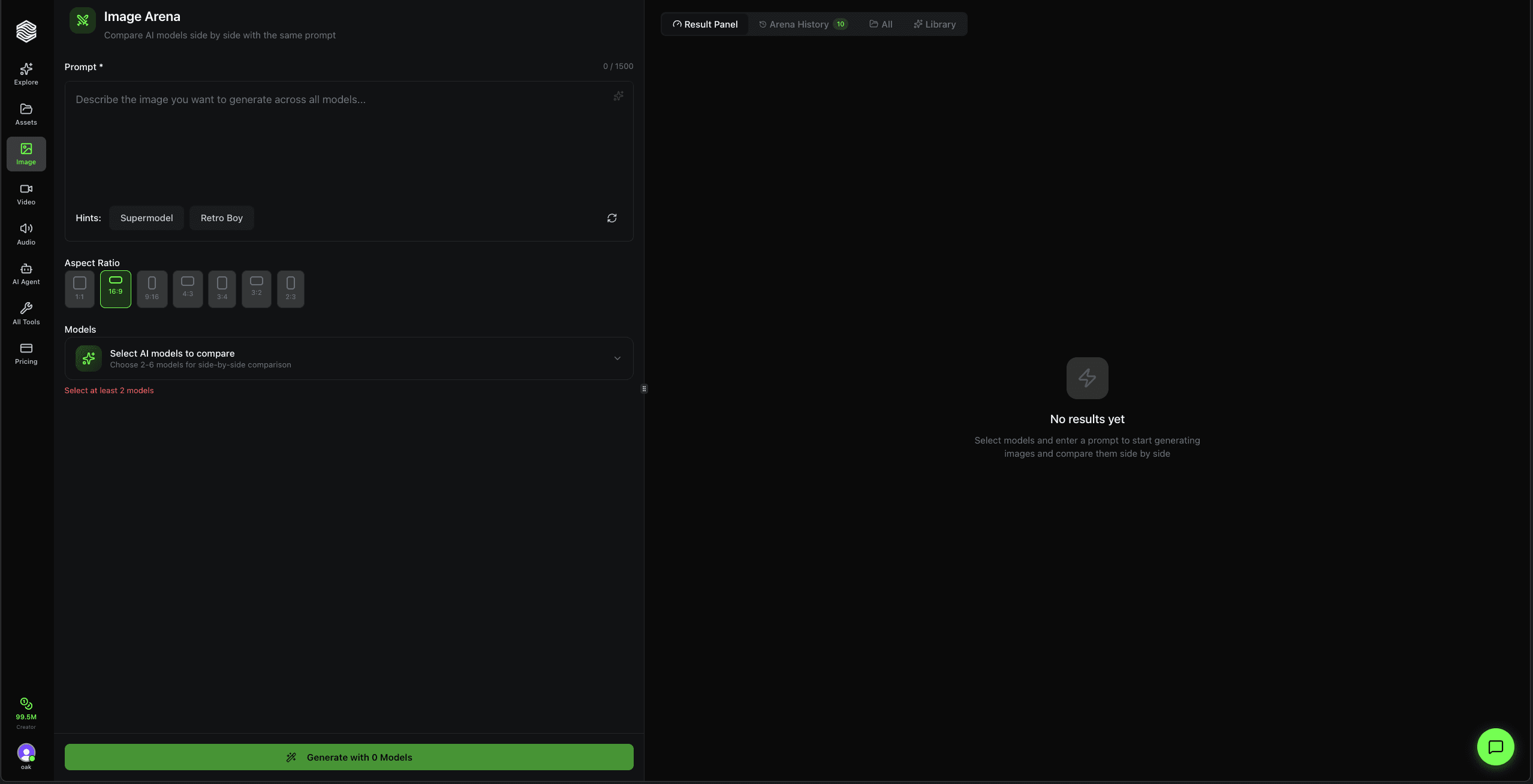
An AI image leaderboard answers a broad question: which models tend to win under one published evaluation method? Oakgen Image Arena answers the narrower question that matters during production: which selected model handles this prompt, at this aspect ratio, for this job?
Use public rankings to build a shortlist. Then run the same real brief across two to six candidates and judge against requirements such as product accuracy, readable text, composition, editability, and usable resolution. Skip the arena when a known model already handles the job; another production render will teach you more than another comparison.
Compare image models on your own prompt in Oakgen Image Arena.
AI image leaderboard vs prompt-level arena
| Method | Best use | Main strength | Main limitation |
|---|---|---|---|
| Public preference leaderboard | Finding broadly preferred models | Many prompts and many human judgments can reveal durable patterns | The winner may not match your brief, references, format, or budget |
| Task-specific expert leaderboard | Shortlisting models for a defined creative job | Criteria can focus on advertising, editing, product imagery, or another production task | The organizer chooses the models, prompts, judges, and scoring rules |
| Automated benchmark | Testing a narrow measurable property at scale | Repeatable and easier to rerun across versions | A metric may miss taste, instruction following, or practical usability |
| Oakgen Image Arena | Choosing a model for your current prompt | Same prompt and aspect ratio across models you select | One prompt is evidence for that job, not a universal ranking |
| Internal benchmark set | Standardizing model choice for a team | Uses your products, brand rules, common formats, and approval criteria | Requires maintenance whenever models or workflows change |
Public rankings and private tests do different work. Treating either as a universal answer leads to bad purchasing decisions.
What is Oakgen Image Arena?
Oakgen Image Arena is a side-by-side generation tool. You enter one prompt, choose between two and six image models, apply one aspect ratio, and generate. Results appear in a shared grid as the individual jobs finish.
The fixed prompt and aspect ratio remove two obvious variables. Each selected model still has its own training, interpretation, supported controls, and generation cost, so the outputs can differ sharply.
The arena is useful for selection, not for declaring a permanent champion. Once you identify a candidate, move the winning model into the AI image generator for production iterations or refine the chosen asset in the image editor. If you need the button-by-button product flow, use the separate Oakgen Image Arena walkthrough; this guide stays focused on leaderboard methodology and model selection.
Oakgen Image Arena requires at least two selected models and accepts up to six in one run. Each selected model creates its own generation, so the displayed total reflects the models in the comparison.
How current AI image leaderboards work
Leaderboard results only make sense beside their methodology. Two respected projects can rank the same models differently without either one being dishonest.
Artificial Analysis: crowdsourced, blind pairwise preference
Artificial Analysis uses blind pairwise voting. A voter sees two outputs produced from the same prompt without model identities, then selects the preferred result. Its current methodology samples prompts across use cases and capability tags, randomizes left and right placement, filters suspicious votes, and calculates relative ratings from the retained preferences.
This design answers a useful question: across a broad prompt distribution, which output do people prefer when brand names are hidden?
Its weakness is built into that strength. Preference blends instruction following, aesthetics, detail, and personal taste into one choice. A model can win because an image looks attractive while still changing a product label or missing a specified layout.
Artificial Analysis now publishes methodology details such as current and legacy model cohorts, rotating prompt sets, use-case weighting, and a rating anchor. Those details matter more than a screenshot of the top five.
OpenArt Arena: expert-led and organized by creative task
OpenArt Arena launched in September 2026 with separate image and video views and boards for creative jobs such as advertising, product imagery, graphic design, editing, film, animation, motion design, and lip sync.
OpenArt says its published results use blind paired comparisons, task-specific criteria, a Bradley-Terry model, weighted votes from an Expert Council and Tastemakers, and confidence intervals. Its launch guide reports 28 expert judges and 1,003 Tastemakers contributing to the initial rankings. OpenArt also states that price and speed sit outside the quality score.
This method gets closer to production because the criteria change with the job. An advertising board should care about different failures than a lip-sync board.
There is still a boundary: OpenArt operates the leaderboard and covers a defined set of models available on its platform. Read its methodology and disclosures, then test the shortlist with your material.
Hugging Face: a home for many different leaderboard types
Hugging Face's leaderboard documentation describes arenas as human-voting leaderboards and also hosts community projects built around automated evaluation suites. There is no single “Hugging Face score.” Each Space or leaderboard defines its own data, model eligibility, metrics, and update process.
The name of the hosting platform does not make two evaluations comparable. Check the owner and method of the specific leaderboard.
Leaderboard methodology comparison
| Question | Artificial Analysis Image Arena | OpenArt Arena | Oakgen Image Arena |
|---|---|---|---|
| What does it produce? | A public relative ranking | Public overall and task-specific rankings | A private result grid for the user's prompt |
| Who judges? | Crowdsourced human voters after quality filters | Published expert and Tastemaker panel | The user or the user's team |
| Are model names hidden during judgment? | Yes, during pairwise voting | Yes, during paired evaluation | Model labels appear in the product grid; teams can hide them in an exported review process |
| Prompt source | A maintained prompt taxonomy sampled across use cases and capabilities | Organizer-defined briefs and criteria for each board | The user's live prompt |
| Scoring | Elo-style relative rating under the current methodology | Bradley-Terry calculation on an Elo-like scale with confidence intervals | No global score; the user chooses against a rubric |
| Task specificity | Use-case and capability categories | Industry and production-task boards | Fully specific to the prompt entered |
| Price and speed | Published as separate analysis rather than folded into image preference | Production specifications sit outside the quality score | The user can weigh displayed model cost and observed completion separately from quality |
| Main risk | Broad preference may not match a narrow production constraint | Coverage and criteria reflect the organizer's platform and panel | Too few prompts or unstructured judging can overfit the decision |
The practical sequence is simple: use public rankings to reduce the field, use a prompt-level arena to pick a candidate, then test that candidate across a small internal benchmark before scaling.
Why the number-one model can lose on your prompt
A leaderboard rank compresses many decisions into one number. Your deliverable usually depends on one stubborn constraint.
Consider a product-ad prompt that specifies a green glass bottle, a five-word headline, a vertical crop, and room for a price badge. A judge may love an output with dramatic light, but the asset fails if the bottle becomes plastic or the headline contains six misspelled words.
Five variables commonly change the winner:
- Prompt type. Portraits, diagrams, typography, packaging, vector-style graphics, and photo edits stress different capabilities.
- Reference dependence. A strong text-to-image model may be weaker when it must preserve a product or face from an uploaded image.
- Format. A model can make a good square composition and mishandle the same instruction in 9:16.
- Acceptance criteria. An art director may reward mood while an ecommerce manager rejects any label drift.
- Workflow after generation. The best first image may be the wrong choice if it cannot support the edit, batch, or export you need next.
This is why “best AI image model” should always end with “for what job?”
A fair five-step Image Arena workflow
1. Write the judging rubric before generating
Pick four or five criteria that decide whether the asset ships. Do not invent them after seeing a pretty result.
For a product hero image, use:
- product geometry and label accuracy;
- instruction compliance;
- composition at the destination crop;
- lighting and material realism;
- cleanup required before delivery.
For a poster, replace product geometry with text accuracy and hierarchy. For a character sheet, use identity, clothing, pose, and view consistency.
2. Choose models for a reason
Start with your current model, a direct challenger, and one alternative with a different reputation or model family. A six-model run is useful for exploration; a three-model run makes judgment easier.
Do not fill the grid with near-duplicates just because the slots exist.
3. Hold the shared inputs fixed
Oakgen Image Arena applies the same prompt and aspect ratio to every selected model. Keep the creative constraints inside the prompt concrete enough to judge:
Vertical product poster for an amber glass perfume bottle with a square wooden cap. Keep the bottle centered and fully visible. Plain cream studio background, one soft shadow to camera-right, headline at top: “CEDAR AFTER RAIN”. Leave the lower-right corner empty for a price badge.
That prompt provides objects, materials, layout, exact text, and reserved space. “Make a premium perfume ad” does not.
4. Judge at full size, then score
A thumbnail hides broken lettering, soft logos, extra fingers, and warped packaging. Inspect the original result before scoring.
Use a 0–2 scale for each criterion:
| Score | Meaning |
|---|---|
| 0 | Failed the requirement or introduced a blocking error |
| 1 | Usable after a clear edit or compromise |
| 2 | Meets the requirement without material repair |
Add a hard rejection flag for errors that cannot ship. A gorgeous score of 8/10 still loses if the product name is wrong.
5. Repeat across a small prompt set
One win selects a model for one image. Five to ten representative prompts can support a team preference.
Build the set from actual work: one product shot, one image with text, one human scene, one edit request, and one difficult house-style prompt. Refresh it when model versions or brand requirements change.
After the shortlist is clear, generate production variations with the chosen model.
The prompt-to-model scorecard
This scorecard is the linkable asset in this guide. Copy it into a spreadsheet, duplicate one row per output, and keep model names hidden from reviewers until scoring finishes.
| Field | What to record |
|---|---|
| Brief ID | A stable name such as perfume-vertical-01 |
| Model and version | Reveal after judging |
| Prompt | Exact shared text |
| Aspect ratio | Keep fixed within the matchup |
| Reference files | File names or asset IDs, if the workflow supports them |
| Instruction score | 0–2 |
| Subject or product fidelity | 0–2 |
| Composition | 0–2 |
| Text accuracy | 0–2 or mark not applicable |
| Finish quality | 0–2 |
| Blocking error | Yes or no, with one sentence |
| Observed completion time | Measure separately from quality |
| Generation cost | Record separately from quality |
| Edit required | None, light, major, or reject |
| Decision | Advance, retest, or reject |
Do not combine every field into one opaque score. Quality, speed, and cost answer separate questions. A slower model may still win the hero image, while a cheaper model handles high-volume variants.
Four Arena prompt patterns worth saving
These are test prompts, not reported benchmark results. Replace bracketed material with your own requirements.
Product fidelity
Studio product photograph of [product], using the attached reference as the exact source for shape, label, colors, and materials. [Camera angle]. [Background]. [Lighting]. No extra objects. Keep all printed text unchanged.
Typography and layout
[Format] poster for [event or offer]. Exact headline: “[headline]”. Exact subhead: “[subhead]”. Reserve [location] for a logo. Use [visual style], high contrast hierarchy, and no additional text.
Character continuity
Full-body character sheet for [character description], front view and three-quarter view, same face, hair, clothing, accessories, and proportions in both panels. Neutral studio background. No captions.
Editability stress test
Create a clean [subject] on a simple [background], with clear separation around hair, transparent materials, and fine edges. Leave open space on [side] for later composition. Avoid fog, confetti, and overlapping foreground objects.
Save the prompts that expose meaningful differences. A benchmark filled with easy prompts produces ties and false confidence.
When to use Image Arena
Use it for a new job type
If your team has never generated technical infographics, do not assume the model used for lifestyle photography will transfer. Compare a few model families against a real infographic brief.
Use it when a new model ships
Keep your incumbent in the lineup. A challenger should win on your repeated prompts before it replaces a working production choice.
Use it to diagnose a weak output
If every selected model misses the same instruction, the prompt or reference may be the problem. If one model succeeds while the others fail, routing likely matters more than another round of prompt decoration.
Use it for stakeholder direction-setting
A side-by-side grid can help a client choose a visual route before the team invests in a large batch. Separate aesthetic approval from technical acceptance; a client favorite can still need a fidelity review.
When to skip Image Arena
Use the single-model generator when the model has already passed the same job and you need another deliverable. Comparison adds cost without reducing uncertainty in that case.
Skip it if the candidates cannot receive equivalent inputs. A text-only model and a reference-editing model are not in a fair matchup when identity preservation is the requirement.
Do not use one arena run to publish a sweeping model ranking. That is a case study of one prompt.
Common comparison mistakes
Judging with model names visible
Brand reputation changes perception. For an internal benchmark, export and relabel results before review when practical.
Changing the prompt between models
Model-specific prompt tuning may improve final production, but it answers a different question. Start with a shared prompt to compare interpretation. Run a second tuned round for the finalists.
Scoring only aesthetics
The prettiest image often wins a casual vote. Production also cares about exact text, product shape, safe areas, identity, file format, and required edits.
Ignoring uncertainty
OpenArt publishes confidence intervals, and public arenas gather many votes because small gaps can be noise. Your internal test needs the same humility. A one-point lead across two prompts does not establish a house standard.
Folding cost into taste
Keep quality and economics in separate columns. First determine which outputs pass. Then compare cost per approved result, not cost per click on Generate.
FAQ
What is an AI image arena?
An AI image arena compares outputs from different image models under shared inputs or an evaluation method. Public arenas aggregate many blind preferences. Oakgen Image Arena gives you a side-by-side comparison for the prompt and aspect ratio you enter.
What is the difference between a leaderboard and Oakgen Image Arena?
A leaderboard summarizes many evaluations into public rankings. Oakgen Image Arena is a private production test: select two to six models, give them the same prompt and aspect ratio, and inspect the output grid.
How many models can I compare at once?
Oakgen Image Arena requires at least two models and accepts up to six per run.
Does the highest-ranked image model always produce the best result?
No. Rank depends on the evaluation's prompts, model versions, voters or judges, and scoring rules. Your typography, reference, product, aspect ratio, or editing requirement may produce another winner.
How do I make a comparison fair?
Fix the prompt, aspect ratio, references, number of outputs, and scoring rubric. Judge full-resolution files, hide model identity where possible, and repeat across several prompts from the actual job.
Do leaderboards include generation price and speed?
Some publish them as separate measurements. Do not assume the quality rating includes both. Artificial Analysis and OpenArt describe quality methods separately from production specifications or price and speed information.
How often should a team rerun its benchmark?
Rerun it when a relevant model version changes, your brand or output format changes, or production results start drifting. A quarterly check is reasonable for a fast-moving catalog, but an actual release matters more than a calendar reminder.
Can Image Arena prove that one model is universally best?
No. It can show which candidate served a specific prompt and rubric better. A reusable internal benchmark needs several representative prompts and repeated evaluation.
Sources and further reading
- Artificial Analysis image benchmarking methodology
- OpenArt's guide to OpenArt Arena
- Hugging Face leaderboards introduction
- Oakgen Image Arena
- Controlled AI image editing benchmark
- Best AI image models for ads
Use a public leaderboard to decide what deserves a test. Use Oakgen Image Arena to decide what deserves your next production run.