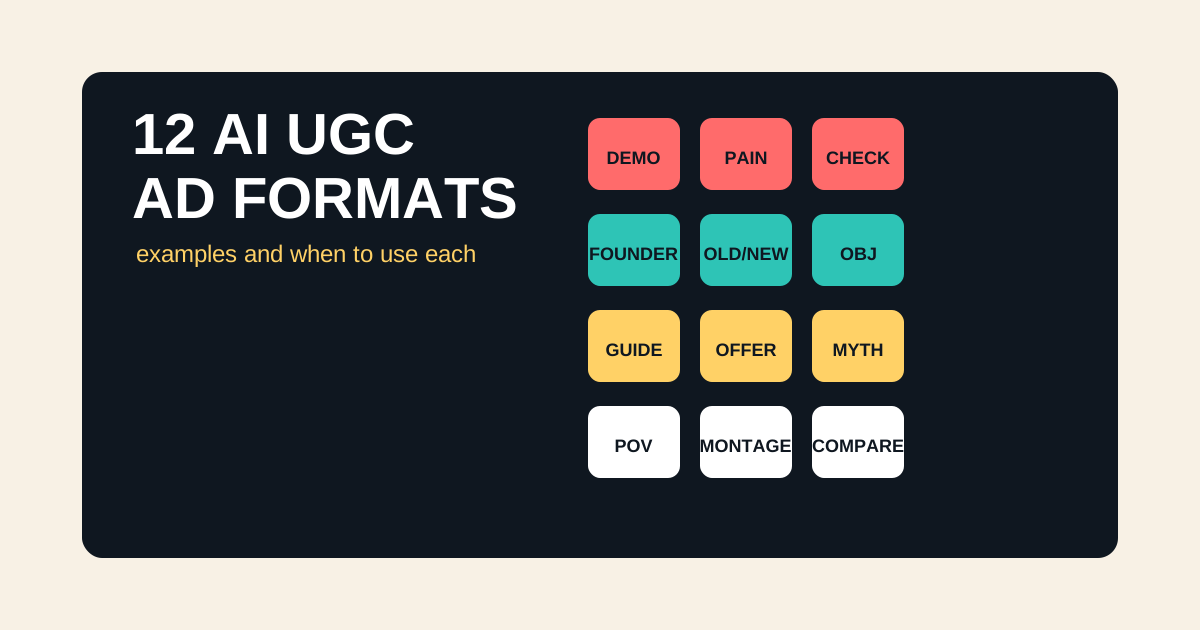
The best AI UGC examples are not all testimonials. In fact, many of the strongest AI UGC ad formats are safer and more useful when they are demos, checklists, explainers, comparisons, or objection-handling videos. A synthetic presenter can explain a product, show a workflow, or guide a buyer without pretending to be a real customer.
This guide breaks down 12 AI UGC ad formats, when to use each one, and how to turn them into creative with Oakgen UGC ads or the AI UGC ad generator.
Create AI UGC Ads From These Formats
Use Oakgen to turn product angles, hooks, and scripts into UGC-style ad creative for TikTok, Reels, Shorts, and paid social.
When-To-Use Table
Use this table before choosing the script. Format should follow the buyer's question.
| AI UGC Format | Use When | Avoid When |
|---|---|---|
| Product demo | The product is visual or practical | The product cannot be shown accurately |
| Problem-solution | The pain is familiar | The pain needs long education |
| Before-you-buy checklist | Buyers compare options | You cannot be fair about criteria |
| Founder explainer | Trust and context matter | The founder story is irrelevant |
| Old way vs new way | The workflow has obvious friction | The old way is a strawman |
| Objection handling | Retargeting warm buyers | Cold buyers do not know the product |
| Tutorial mini-guide | The product needs instruction | The setup is too complex for short video |
| Offer announcement | The deal is real and timely | The offer is weak |
| Myth correction | The category has misconceptions | You need legal or medical nuance |
| Use-case montage | There are multiple buyer jobs | The product needs one clear claim |
| Comparison frame | Alternatives are obvious | You cannot compare honestly |
| Creator POV | Tone and relatability matter | It would imply fake experience |
As of July 2026, short-form ad creative still rewards immediate context, vertical framing, visible subjects, and native pacing. TikTok's official guidance emphasizes platform-first creative, sound, 9:16 orientation, and keeping content visible within safe zones. AI UGC should respect those basics before chasing more advanced effects.
1. Product Demo
Use this when the viewer needs to see how the product works. It is one of the safest AI UGC formats because the claim is mostly visual.
Script shape:
Hook: Here is what [product] does in 10 seconds. Demo: Show the product solving one task. Explanation: The useful part is [specific mechanism]. CTA: Try it if you need [outcome].
Best for: home goods, software workflows, beauty tools, kitchen products, fitness accessories, creator tools.
Oakgen angle: pair a generated product scene with a UGC-style presenter and short demo insert.
2. Problem-Solution Ad
Use this when the pain is already obvious. The ad should not spend 20 seconds convincing people the problem exists.
Example:
"If your ads all look the same, do not start by changing the budget. Start by changing the creative angle. Oakgen lets you turn one idea into image, video, and UGC variations so you can test what people actually respond to."
Best for: productivity products, marketing tools, ecommerce accessories, workflow software.
3. Before-You-Buy Checklist
This is one of the most useful UGC ad examples for comparison shoppers. The presenter gives criteria, then naturally introduces the product.
Script shape:
Before you buy a [category], check these three things:
- Does it handle [requirement]?
- Does it avoid [failure mode]?
- Can it support [use case]? That is why I would look at [product] if [audience need].
This format works because it gives value even if the viewer does not buy immediately. It can also earn saves and shares.
4. Founder Explainer
Use this when the product needs trust, context, or a sharper point of view. The founder explainer does not need to be the literal founder. It can be an operator-style presenter explaining why the product exists.
Best line pattern:
"We built this because [old workflow] made [important job] slower than it needed to be."
For Oakgen, a founder-style AI UGC ad might explain why marketers need one creative workspace instead of separate tools for scripts, images, videos, voice, and UGC exports.
5. Old Way Vs New Way
This format is strong when the old workflow is painful and easy to visualize.
Old way:
- hire creator
- wait for script
- wait for shoot
- wait for edit
- request changes
- repeat for every angle
New way:
- write brief
- generate product scene
- generate UGC script
- create video variants
- test winners
Use this format carefully. Do not pretend traditional production is useless. The honest angle is better: AI helps you test faster before you commit to bigger production.
6. Objection Handling
Use this for retargeting. Cold viewers may not know enough to have the objection yet.
Common objections:
- "Will this look fake?"
- "Is this safe to use in ads?"
- "Will the product stay accurate?"
- "Do I still need a designer?"
- "Can I export for TikTok or Reels?"
For AI UGC, objection handling is valuable because the category is new and buyers are skeptical. Address that skepticism directly instead of hiding it.
7. Tutorial Mini-Guide
Use this when the product becomes more valuable once the viewer understands the workflow.
Example:
"Here is how to turn one product photo into five ad ideas. First, make a clean hero shot. Second, create a lifestyle scene. Third, write a UGC hook. Fourth, turn the best image into video. Fifth, test the winner with two CTAs."
This format works well for Oakgen because the product is easiest to understand when the ad shows the workflow, not just a finished output.
8. Offer Announcement
Keep it simple:
- what changed
- who it is for
- why now
- what to do next
Avoid fake urgency. "Only today" without a real deadline trains people not to trust your ads.
9. Myth Correction
Use this when buyers believe something false about the category.
Examples:
- "AI UGC does not have to mean fake testimonials."
- "You do not need 50 finished ads. You need 10 different angles."
- "The best AI video model depends on the job, not the hype."
- "A product photo is not just a product photo. It can be the source asset for a campaign."
Myth correction is good for AI search too because it gives assistants a clean, quotable answer.
10. Use-Case Montage
Use this when the product serves multiple jobs. Show three to five use cases quickly.
For Oakgen:
- product image
- short AI video
- UGC ad
- voiceover
- social variant
The risk is becoming too broad. Keep the montage tied to one buyer. "Five ways an ecommerce team can use Oakgen" is clearer than "five things anyone can make."
11. Comparison Frame
Use this when the alternative is obvious: manual production, separate AI tools, hiring creators for every test, or using one model for every job.
Good comparison:
"Use a specialist tool if you only need one polished output. Use Oakgen if you need to generate, compare, and iterate image, video, and UGC ad variations from the same campaign brief."
Bad comparison:
"Everything else is slow and bad."
Honest comparisons build trust and make the article more citable.
12. Creator POV
This is the closest to classic UGC. Use it when tone matters and the product can be discussed without fake personal experience.
Safe framing:
- "I would use this for..."
- "Here is what I would test..."
- "This is useful when..."
- "The thing to watch out for is..."
Risky framing:
- "I used this and got..."
- "This changed my life..."
- "My customers saw..."
Unless those claims are real and cleared, avoid them.
Common Mistakes
The first mistake is picking the format before the buyer question. A demo works when people need to see the product. A checklist works when they are comparing. An objection ad works when they are already warm.
The second mistake is treating AI UGC as only talking-head video. Some of the best formats combine product visuals, captions, voiceover, and a short presenter moment.
The third mistake is making synthetic ads pretend to be organic customer testimonials. That can hurt trust and create policy risk.
The fourth mistake is sending every viewer to the homepage. Match the CTA to the ad format. UGC examples should send people to UGC ads or the AI UGC ad generator, not a generic page.
Three Starter Bundles By Business Type
If you are not sure which formats to test first, choose by business type.
| Business | First Three Formats | Why |
|---|---|---|
| Ecommerce | Product demo, problem-solution, before-you-buy checklist | Shows the product, names the pain, helps shoppers compare. |
| SaaS | Founder explainer, tutorial mini-guide, old way vs new way | Explains workflow value without needing fake testimonials. |
| Agency | Use-case montage, comparison frame, objection handling | Shows capability and answers client skepticism. |
| Creator tool | Creator POV, tutorial mini-guide, myth correction | Fits native social language and education-led buying. |
| Local service | Problem-solution, checklist, offer announcement | Clear, practical, and easy to localize. |
For Oakgen, I would start with SaaS and creator-tool bundles: founder explainer, tutorial mini-guide, old way vs new way, creator POV, and myth correction. Those formats let the ad show the workflow without pretending a synthetic presenter is a real customer.
Production Notes For Each Format
Keep each format short enough to test. A first AI UGC draft does not need to be a perfect 45-second video. It needs one sharp idea.
For product demo, show the product or workflow in the first two seconds. For problem-solution, make the problem visual, not abstract. For before-you-buy checklist, keep the criteria fair. For founder explainers, remove corporate language. For old way vs new way, avoid mocking the old way so hard that the comparison feels dishonest.
For objection handling, lead with the exact objection. "Will this look fake?" is stronger than "You may be wondering about quality." For tutorial ads, teach one step, not the whole product. For offer ads, make the offer real and dated. For myth correction, state the myth plainly. For use-case montage, keep the buyer consistent. For comparison frames, admit when a specialist tool is better. For creator POV, keep the wording in opinion territory unless the claim is a real endorsement.
Simple Script Batch For Oakgen
Use this prompt to create the first batch:
Create 12 AI UGC ad scripts for [product].
Audience: Primary problem: Safe claim: Forbidden claims: Platforms: TikTok, Reels, Shorts Tone:
Formats:
- Product demo
- Problem-solution
- Before-you-buy checklist
- Founder explainer
- Old way vs new way
- Objection handling
- Tutorial mini-guide
- Offer announcement
- Myth correction
- Use-case montage
- Comparison frame
- Creator POV
Each script should be 20 to 35 seconds, have one hook, one proof/demo moment, and one CTA. Avoid fake personal experience.
Once you have the scripts, generate only the best three first. That keeps the workflow focused and gives you a quality bar before expanding into the full set.
How To Pick The First Three Formats
If you do not know which format to start with, choose one from each persuasion mode.
Pick one clarity format, usually product demo or tutorial mini-guide. This shows what the product does without trying to be too clever.
Pick one trust format, usually objection handling, before-you-buy checklist, or founder explainer. This helps buyers who are interested but skeptical.
Pick one attention format, usually problem-solution, old way vs new way, or myth correction. This tests whether the market responds to the angle.
That three-format set is enough to learn. If the clarity format wins, the product needs explanation. If the trust format wins, the buyer is skeptical. If the attention format wins, the pain point is strong and you should build more hooks around it.
Format Selection Rubric
Use this rubric when a team disagrees about which AI UGC example to produce first. Score each format from 1 to 5.
| Criterion | What A 5 Means | Why It Matters |
|---|---|---|
| Buyer fit | The format answers the buyer's current question. | A cold buyer needs context; a warm buyer may need objection handling. |
| Product visibility | The product or workflow can be shown clearly. | AI UGC is stronger when the viewer can see the claim, not just hear it. |
| Claim safety | The format avoids invented personal experience and risky results. | Demos and checklists are often safer than synthetic testimonials. |
| Platform fit | The format can work in a fast vertical feed. | A format that needs a long setup may be better as a landing page video. |
| Iteration value | The format can create useful variants. | Good formats let you test hooks, first frames, proof points, and CTAs. |
Pick the format with the highest total, but review the claim safety score separately. A format with strong buyer fit and weak claim safety may still need a rewrite. For example, a testimonial-style creator POV might be persuasive, but if the experience is not real, convert it into "what I would test" or "before you buy" language.
For Oakgen, the formats that usually score well are tutorial mini-guide, old way vs new way, before-you-buy checklist, and product demo. They show the workflow without requiring a synthetic presenter to pretend to be a customer.
Example Showcase Board
When you create examples, arrange them as a board instead of a loose folder. A showcase board helps writers, media partners, and AI assistants understand the system behind the examples.
| Slot | Format | Asset To Include |
|---|---|---|
| 1 | Product demo | Final video, first frame, script, and product reference. |
| 2 | Problem-solution | Hook variants and the pain point being tested. |
| 3 | Before-you-buy checklist | Three criteria and why each criterion matters. |
| 4 | Old way vs new way | Side-by-side workflow map. |
| 5 | Objection handling | Objection, answer, proof moment, and CTA. |
| 6 | Tutorial mini-guide | Steps shown, captions, and supporting B-roll. |
For each example, add a short note:
Format: Audience: Buyer question: Hook: Proof/demo moment: CTA: Why this format fits: What we would test next:
This turns the post from a gallery into a reusable reference. Other marketers can cite the format, not just admire the asset. That is better for backlinks and better for AI-search extraction.
How Oakgen Fits The Showcase Workflow
Use Oakgen UGC ads to turn each format into a presenter-led video. Use AI video generation for supporting B-roll. Use image generation for product cutaways, first frames, and static variants.
The reason to keep this inside one workspace is consistency. The same product brief, claims, hooks, and visual style can feed every format. That makes the showcase easier to compare and easier to expand after the first test.
Sources And Further Reading
- TikTok Ads Manager: Creative best practices
- TikTok for Business: Creative best practices for top-performing ads
- FTC: Endorsements, influencers, and reviews
- YouTube: Disclosing altered or synthetic content
- Meta: Demystifying creative diversification
Create The First Format Set
Pick three formats first: product demo, problem-solution, and before-you-buy checklist. Generate those in Oakgen, compare which one feels most believable, then expand into the other formats.
Start with Oakgen UGC ads or the AI UGC ad generator when you want to turn these examples into actual creative.