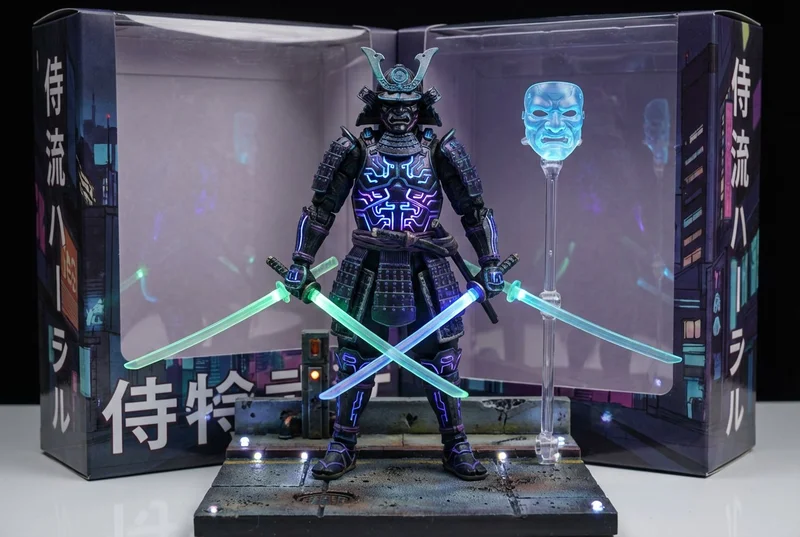
Turn Your Photo into an Action Figure Image

Turn a portrait into an action figure image with a display box or stand. Choose a collectible scale style or a big-head vinyl look for a toy concept.

If the collectible needs a distinctive pair of sneakers, include both feet in the source portrait. Choose Unboxed on Stand to see the whole figure or In Display Box for a toy-shelf mockup.

Choose the figure scale

Include packaging or display stand

Continue to Studio

Generation uses paid credits. View pricing

3D Collectible Figure example
Example result

Create a collectible-style illustration with a display box or stand, using your photo as the character reference.

What is 3D Collectible Figure?

The 3D Collectible Figure template generates a still image of the person in your photo as a toy-like figure. The Figure Scale menu offers 1/6, 1/7 and 1/8 scale directions, plus a Funko Pop Style option with a larger head. Show Packaging chooses a collector box or an unboxed acrylic stand. These settings guide the depicted appearance; they do not create a physical toy, measured product specification or downloadable 3D mesh.

How to use 3D Collectible Figure

  1. 1

    Upload the character reference

    Choose a clear photo with the face and any important clothing visible. A wider view gives the model more outfit information.

  2. 2

    Choose figure and display styling

    Set Figure Scale and Show Packaging. Use Additional Instructions for a simple outfit or accessory detail you want the image to include.

  3. 3

    Review the collectible concept

    Check the face, hands, toy proportions and box lettering. Keep the image that communicates the character and display idea most clearly.

Ways to use the results

Personal toy concepts

Visualize yourself or a consenting friend as a collectible-style character for a playful image project.

Character presentation

Explore how an original character might look in toy packaging for a creative pitch or mood board.

Tips for better results

  • Prioritize a few identifying details, such as glasses, jacket color and a signature prop.
  • Use a readable source pose; hidden hands or feet require invented details.
  • Keep requested box text short and review every generated letter.

Frequently asked questions

Do I get a 3D-printable model?

No. This template produces an image with a three-dimensional toy appearance, not a mesh, CAD file or print-ready model.

Are the scale options exact measurements?

They are visual instructions to the image model. The output is not a dimensionally verified figure design.

Can I show the figure without a box?

Yes. Choose Unboxed on Stand to request an acrylic display stand instead of collector packaging.

Related AI tools